> ## Documentation Index
> Fetch the complete documentation index at: https://docs.koalavault.ai/llms.txt
> Use this file to discover all available pages before exploring further.
# Crypto Wallet Setup
> This guide walks you through setting up a cryptocurrency wallet to buy and sell models on KoalaVault
Currently, we only support USDT (Tether) on the BSC (Binance Smart Chain) network for all transactions.
## Why Cryptocurrency?
KoalaVault uses cryptocurrency payments for:
* ✅ **Global accessibility** - Works in 140+ countries
* ✅ **End-to-end transactions** - Direct payment to seller, no KoalaVault intermediary
## Supported Networks and Tokens
* **Token**: USDT (Tether - a stablecoin pegged to USD)
* **Network**: BSC (Binance Smart Chain), BEP-20 for USDT
* **Why BSC?**: Extremely low transaction fees and fast confirmation times
## How to Get a BSC Wallet Address
**How to understand concepts like "Wallet Address", "Network", "Token"?**
* **Wallet**: In the most basic sense, a wallet is just an asymmetric key pair (with public key and private key). The public key (or hash of the public key) is your **wallet address**, and the private key is your **password to the wallet**.
* You can create as many wallets as you want, since you can generate as many public key/private key pairs as you want.
* Others can send cryptocurrency to your wallet address, and you can use the private key to sign transactions to spend the cryptocurrency.
* So you can safely share your wallet address with others, but keep the private key private.
* **Network**: Also known as "blockchain", you can think of it as a **"code repo"** (while actually it's a **"transaction repo"**) of all the transactions that have ever happened in this repo (**think of it as commit push to the repo**).
* Each transaction is a record of a transfer of cryptocurrency from one wallet address to another. More like **"I, John, tell the world, that Tom has XX additional USDT in his wallet, which he got from me"**. Since only John has the private key to sign this transaction, others can verify it, but not change it.
* There are many different networks (**"transaction repos"**), each with their own unique features and rules.
* For each network (**"transaction repo"**), it is not controlled by a single entity, but somehow managed by the whole community of users. (The biggest difference between a real blockchain and a **"repo"**).
* **Token**: The token is the cryptocurrency itself. Think of it as the **"code"** in the **"transaction repo"**.
* Each network (**"transaction repo"**) can have multiple tokens (**"code in C, C++, Python, etc."**), each with their own unique features and rules.
* Each token (**"code"**) can be hosted on different networks (**"transaction repos"**), but the token accros different networks (**"transaction repos"**) cannot be transferred directly (**"different context in different repos"**).
We recommend using Binance for beginners because:
* Easy to buy USDT directly
* No need to manage private keys
* Built-in security features
* Customer support available
Choose the appropriate platform for your region:
* **Global Users** (140+ countries): [binance.com](https://www.binance.com)
* **US Users**: [binance.us](https://www.binance.us)
Complete the registration process including:
1. Email/phone verification
2. Identity verification (KYC)
3. Enable 2FA for security
Access your Binance wallet deposit page:
* **Global**: [Binance Deposit Page](https://www.binance.com/en/my/wallet/account/main/deposit/crypto)
* **US**: [Binance.US Deposit Page](https://www.binance.us/en/my/wallet/account/main/deposit/crypto)
Click on **Deposit Crypto**

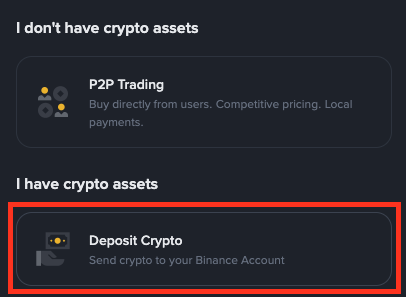 Configure the deposit settings:
1. In the **Select Coin** dropdown, choose `USDT`
2. In the **Select Network** dropdown, choose `BSC` (Binance Smart Chain)
**Important**: Always select **BSC** network. Using other networks (like Ethereum or Tron) will result in lost funds.
Configure the deposit settings:
1. In the **Select Coin** dropdown, choose `USDT`
2. In the **Select Network** dropdown, choose `BSC` (Binance Smart Chain)
**Important**: Always select **BSC** network. Using other networks (like Ethereum or Tron) will result in lost funds.
 A deposit address will be generated for you:
* The address is 42 characters long
* Starts with `0x`
* Example: `0x0a328fb948ea4e69df4bf008163923a720ad60f5`
**Copy this address** - you'll need it in the configuration of your [KoalaVault acount payment settings](https://www.koalavault.ai/payment-settings).
Save this address somewhere safe. You can always find it again by returning to the Binance deposit page.
## Frequently Asked Questions
**For Sellers**: No, you'll receive USDT from buyers directly to your wallet address.
**For Buyers**: Yes, you need to have USDT in your Binance account to make purchases. You can:
* Buy USDT with your credit/debit card on Binance
* Transfer from another exchange
* Use P2P trading on Binance
* **BSC Network Fee**: \~$0.10-$0.50 per transaction
* **KoalaVault Platform Fee**: Varies by model, set by seller
* **Binance Withdrawal Fee**: Small fee when withdrawing USDT (typically \~\$0.80)
Yes, when following best practices:
* ✅ Enable 2FA on your Binance account
* ✅ Never share your private keys
* ✅ Always verify the wallet address before sending funds
* ✅ Use only the BSC network as specified
* ✅ Start with small amounts to test
Yes! Any BSC-compatible wallet works. However, we recommend Binance for beginners because:
* Easy to buy USDT directly
* No need to manage private keys
* Built-in security features
* Customer support available
* **BSC transactions**: Usually 1-3 minutes for confirmation
* **Binance withdrawals**: 5-30 minutes depending on security checks
* **KoalaVault verification**: Automatic after blockchain confirmation
## Alternative Wallets
While we recommend Binance for beginners, you can also use:
Popular browser extension wallet. Configure BSC network manually.
Mobile wallet with built-in BSC support.
Binance's official Web3 wallet with seamless integration.
Hardware and software wallet supporting BSC.
## Need Help?
If you encounter any issues:
* 💬 [Binance Support](https://www.binance.com/en/support) - For wallet-related questions
* 🎯 [KoalaVault Discord](https://discord.gg/koalavault) - Community support and discussions
* 🐛 [Report Issues on GitHub](https://github.com/koalavault-ai/koalavault.ai/issues) - Technical problems and bug reports
A deposit address will be generated for you:
* The address is 42 characters long
* Starts with `0x`
* Example: `0x0a328fb948ea4e69df4bf008163923a720ad60f5`
**Copy this address** - you'll need it in the configuration of your [KoalaVault acount payment settings](https://www.koalavault.ai/payment-settings).
Save this address somewhere safe. You can always find it again by returning to the Binance deposit page.
## Frequently Asked Questions
**For Sellers**: No, you'll receive USDT from buyers directly to your wallet address.
**For Buyers**: Yes, you need to have USDT in your Binance account to make purchases. You can:
* Buy USDT with your credit/debit card on Binance
* Transfer from another exchange
* Use P2P trading on Binance
* **BSC Network Fee**: \~$0.10-$0.50 per transaction
* **KoalaVault Platform Fee**: Varies by model, set by seller
* **Binance Withdrawal Fee**: Small fee when withdrawing USDT (typically \~\$0.80)
Yes, when following best practices:
* ✅ Enable 2FA on your Binance account
* ✅ Never share your private keys
* ✅ Always verify the wallet address before sending funds
* ✅ Use only the BSC network as specified
* ✅ Start with small amounts to test
Yes! Any BSC-compatible wallet works. However, we recommend Binance for beginners because:
* Easy to buy USDT directly
* No need to manage private keys
* Built-in security features
* Customer support available
* **BSC transactions**: Usually 1-3 minutes for confirmation
* **Binance withdrawals**: 5-30 minutes depending on security checks
* **KoalaVault verification**: Automatic after blockchain confirmation
## Alternative Wallets
While we recommend Binance for beginners, you can also use:
Popular browser extension wallet. Configure BSC network manually.
Mobile wallet with built-in BSC support.
Binance's official Web3 wallet with seamless integration.
Hardware and software wallet supporting BSC.
## Need Help?
If you encounter any issues:
* 💬 [Binance Support](https://www.binance.com/en/support) - For wallet-related questions
* 🎯 [KoalaVault Discord](https://discord.gg/koalavault) - Community support and discussions
* 🐛 [Report Issues on GitHub](https://github.com/koalavault-ai/koalavault.ai/issues) - Technical problems and bug reports