

Currently, we only support USDT (Tether) on the BSC (Binance Smart Chain) network for all transactions.
Why Cryptocurrency?
KoalaVault uses cryptocurrency payments for:- ✅ Global accessibility - Works in 140+ countries
- ✅ End-to-end transactions - Direct payment to seller, no KoalaVault intermediary
Supported Networks and Tokens
- Token: USDT (Tether - a stablecoin pegged to USD)
- Network: BSC (Binance Smart Chain), BEP-20 for USDT
- Why BSC?: Extremely low transaction fees and fast confirmation times
How to Get a BSC Wallet Address
1
Register a Binance Account
We recommend using Binance for beginners because:
- Easy to buy USDT directly
- No need to manage private keys
- Built-in security features
- Customer support available
- Global Users (140+ countries): binance.com
- US Users: binance.us
- Email/phone verification
- Identity verification (KYC)
- Enable 2FA for security
2
Navigate to Deposit Page
Access your Binance wallet deposit page:
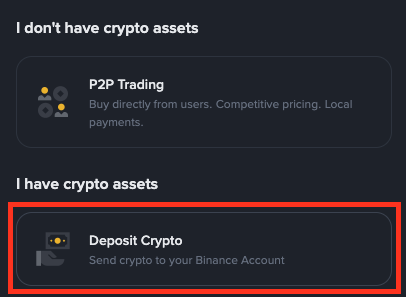
- Global: Binance Deposit Page
- US: Binance.US Deposit Page
3
Select USDT and BSC Network
Configure the deposit settings:
- In the Select Coin dropdown, choose
USDT - In the Select Network dropdown, choose
BSC(Binance Smart Chain)
4
Copy Your Wallet Address
A deposit address will be generated for you:
- The address is 42 characters long
- Starts with
0x - Example:
0x0a328fb948ea4e69df4bf008163923a720ad60f5
Frequently Asked Questions
Do I need to buy USDT first?
Do I need to buy USDT first?
For Sellers: No, you’ll receive USDT from buyers directly to your wallet address.For Buyers: Yes, you need to have USDT in your Binance account to make purchases. You can:
- Buy USDT with your credit/debit card on Binance
- Transfer from another exchange
- Use P2P trading on Binance
What are the transaction fees?
What are the transaction fees?
- BSC Network Fee: ~0.50 per transaction
- KoalaVault Platform Fee: Varies by model, set by seller
- Binance Withdrawal Fee: Small fee when withdrawing USDT (typically ~$0.80)
Is it safe to use cryptocurrency?
Is it safe to use cryptocurrency?
Yes, when following best practices:
- ✅ Enable 2FA on your Binance account
- ✅ Never share your private keys
- ✅ Always verify the wallet address before sending funds
- ✅ Use only the BSC network as specified
- ✅ Start with small amounts to test
Can I use a different wallet (MetaMask, Trust Wallet, etc.)?
Can I use a different wallet (MetaMask, Trust Wallet, etc.)?
Yes! Any BSC-compatible wallet works. However, we recommend Binance for beginners because:
- Easy to buy USDT directly
- No need to manage private keys
- Built-in security features
- Customer support available
How long do transactions take?
How long do transactions take?
- BSC transactions: Usually 1-3 minutes for confirmation
- Binance withdrawals: 5-30 minutes depending on security checks
- KoalaVault verification: Automatic after blockchain confirmation
Alternative Wallets
While we recommend Binance for beginners, you can also use:MetaMask
Popular browser extension wallet. Configure BSC network manually.
Trust Wallet
Mobile wallet with built-in BSC support.
Binance Wallet
Binance’s official Web3 wallet with seamless integration.
SafePal
Hardware and software wallet supporting BSC.
Need Help?
If you encounter any issues:- 💬 Binance Support - For wallet-related questions
- 🎯 KoalaVault Discord - Community support and discussions
- 🐛 Report Issues on GitHub - Technical problems and bug reports